Which Geo Area Calculator Provides More Precise Land Measurements?
Which geo area calculator is more precise? Read full article below
When it comes to measuring land, having accurate measurements is crucial for a variety of reasons. Whether you are a farmer, a real estate agent, or a surveyor, knowing the exact size of a piece of land can help you make better decisions about its use, value, and potential.
One of the most common ways to measure land is through the use of technology, specifically GPS and Google Maps. Both of these tools offer powerful geo area calculators that can help you accurately measure the size of a piece of land, but which one is more precise?
GPS, or Global Positioning System, is a technology that uses a network of satellites to determine the exact location of a device or object. GPS can be incredibly precise, with some devices able to measure locations within a few millimeters. When it comes to measuring land, GPS can provide highly accurate measurements of the perimeter of a piece of land.
However, using GPS to measure the area of a piece of land can be more challenging. This is because GPS measures the perimeter of the land, but does not take into account the irregular shape of the land. As a result, GPS measurements may be less precise when calculating the area of a piece of land.
On the other hand, Google Maps uses satellite imagery to provide a visual representation of the land, which can help you determine the precise shape and size of a piece of land. Google Maps also offers an area calculator app that can help you accurately measure the area of a piece of land. This tool uses the shape of the land as well as other factors, such as elevation and terrain, to provide a more accurate measurement of the land's area.
However, Google Maps can also have some limitations when it comes to measuring land. For example, the resolution of the satellite imagery used by Google Maps may not be high enough to accurately capture the details of the land's shape. Additionally, the accuracy of Google Maps measurements may be affected by factors such as cloud cover or atmospheric conditions.
So, which geo area calculator is more precise? The answer may depend on the specific needs of the user. For measuring the perimeter of a piece of land, GPS may be more accurate. However, for measuring the area of a piece of land, Geo Measure may be more precise due to its ability to capture the land's shape and other factors that affect its area.
While GPS and Google Maps are powerful tools for measuring land, Geo Measure offers some distinct advantages for those looking to get the most accurate measurements possible. Geo Measure uses advanced algorithms to provide highly accurate measurements of land area, perimeter, and distance. The tool takes into account the shape of the land as well as other factors that affect its measurement, such as elevation and terrain.
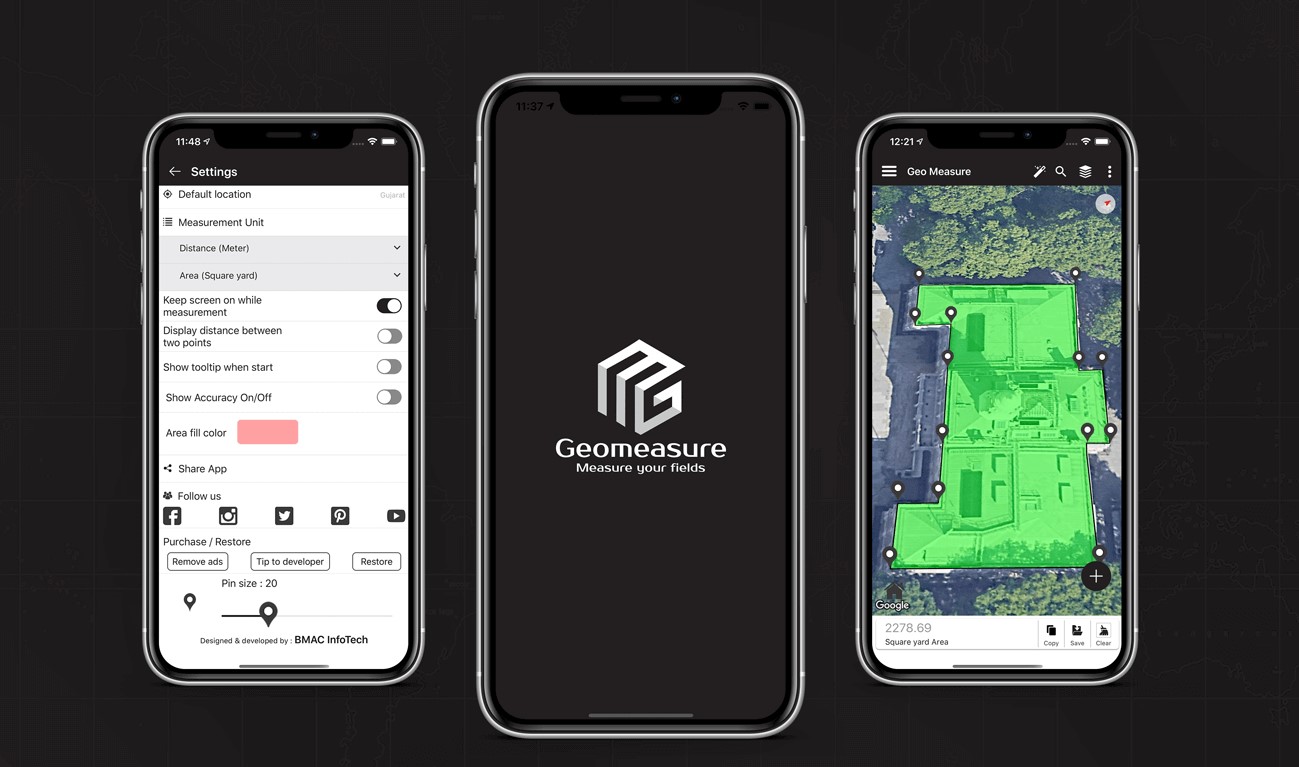
Geo Measure is also designed to be user-friendly, with a simple and intuitive interface that makes it easy to get started. The tool is compatible with a wide range of devices and platforms, including desktop computers, laptops, tablets, and smartphones. This means you can use the tool no matter where you are or what type of device you have. And perhaps best of all, Geo Measure is available at a low cost, making it an affordable solution for those who need to measure land on a regular basis.
Why Geo Measure is the Best Fit for Land Measurement
While GPS and Google Maps are powerful tools for measuring land, Geo Measure offers some distinct advantages for those looking to get the most accurate measurements possible. Here are a few reasons why Geo Measure may be the best fit for your land measurement needs:
High Precision: Geo Measure uses advanced algorithms to provide highly accurate measurements of land area, perimeter, and distance. The tool takes into account the shape of the land as well as other factors that affect its measurement, such as elevation and terrain.
Ease of Use: Geo Measure is designed to be user-friendly, with a simple and intuitive interface that makes it easy to get started. You can use the tool to measure any shape of the land, from small residential plots to large commercial properties.
Compatibility: Geo Measure is compatible with a wide range of devices and platforms, including desktop computers, laptops, tablets, and smartphones. This means you can use the tool no matter where you are or what type of device you have.
Cost-effective: Geo Measure is available at a low cost, making it an affordable solution for those who need to measure land on a regular basis.
How to Use Geo Measure for Land Measurement
Using Geo Measure is easy! Here's how to get started:
- Go to the Geo Measure Android or iPhone app.
- Select the type of measurement you want to take (area, distance, POI).
- Use the map to draw the shape of the land you want to measure.
- Geo Measure will automatically calculate the measurement and display it on the screen.
- You can save your measurements for future reference or export them to KML File
Benefits of Using Geo Measure for Land Measurement
Using GeoMeasure for land measurement offers a number of benefits, including:
Accuracy: Geo Measure provides highly accurate measurements of land area, perimeter, and distance, taking into account a wide range of factors that can affect the measurement.
Time-saving: Geo Measure is designed to be fast and efficient, allowing you to measure land quickly and easily.
Flexibility: Geo Measure can be used on a wide range of devices and platforms, including desktop computers, laptops, tablets, and smartphones.
Affordable: Geo Measure is available at a low cost, making it an affordable solution for those who need to measure land on a regular basis.
Testimonials from Satisfied Geo Measure Users
Here are some testimonials from satisfied Geo Measure users:
"I've been using Geo Measure for several months now and it has completely transformed the way I measure land. The accuracy of the measurements is incredible and the tool is so easy to use. I would highly recommend Geo Measure to anyone who needs to measure land on a regular basis." - John, farmer
"As a real estate agent, I need to measure land all the time. I used to use GPS and Google Maps, but they were never quite accurate enough for my needs. Since I started using Geo Measure, I've been able to provide my clients with much more accurate measurements, which has helped me close more deals." - Sarah, real estate agent
"I'm a surveyor, and I've been using Geo Measure for all of my land measurement needs for the past year. The accuracy of the measurements is unparalleled, and the tool is so easy to use. I couldn't imagine going back to using GPS or Google Maps." - Mike, surveyor
GPS vs Google Maps vs Geo Measure: A Comparison
To help you better understand the differences between GPS, Google Maps, and Geo Measure, let's take a closer look at each tool:
GPS:
Pros: Can provide highly accurate measurements of the land perimeter; works well in remote locations with no internet access
Cons: May be less precise when measuring land area; requires specialized equipment
Google Maps:
Pros: Provides a visual representation of land that can help you accurately measure land area; easy to use
Cons: May not capture the full details of the land's shape; may be affected by cloud cover or other environmental factors
Geo Measure:
Pros: Provides highly accurate measurements of land area, perimeter, and distance; user-friendly interface; compatible with a wide range of devices; cost-effective
Cons: May require an internet connection for the best results
Conclusion:
While GPS and Google Maps are powerful tools for measuring land, Geo Measure offers some distinct advantages that make it the best fit for those who need the most accurate measurements possible. Whether you are a farmer, real estate agent, or surveyor, Geo Measure can help you make better decisions about the use, value, and potential of the land you are working with.


